What It Means to Inherit a DataKeeper Environment
The concept of inheritance often brings to mind assets passed down from one individual to another. Webster and other dictionaries define inheritance as:
An inheritance consists of the assets, property, and sometimes debts left behind by a deceased person, distributed to beneficiaries via a will, trust, or state intestacy laws. It commonly includes cash, real estate, stocks, bonds, personal items (jewelry, cars), and business interests.”
In the world of IT, inheritance takes on a digital twist. When a Systems Administrator inherits a cluster that utilizes tools like DataKeeper, they’re not dealing with tangible assets like jewelry or real estate, but rather digital resources—think configurations, roles, and critical volume resources. And while this inheritance is hopefully the result of someone retiring from the company or receiving a well-earned promotion, we’ll cross our fingers it isn’t due to someone transitioning to that “great BIG data center in the sky.” (Yes, humor is a coping mechanism for IT professionals!)
So, if you’re the lucky recipient of an existing 1×1 cluster with a SQL Server role and associated DataKeeper Volume resources, where do you begin? What steps should you take to ensure a smooth onboarding and knowledge transfer process?
To help guide that transition, here are some key questions you should ask yourself or your Management Team:
Account Administration Questions
Account Manager Details
- Who is the current Account Manager responsible for this account?
- What are their contact details (email, phone, etc.)?
Licensing Information
- What is the status of your licensing agreement, contracts, and renewals?
- Are there any upcoming licensing expirations or renewal deadlines one should be aware of?
- Where can I access the licensing portal, and do I have the necessary credentials?
DataKeeper Administration Questions
Comprehending the Environment
- Assess the current infrastructure, to include Windows Server Failover Clustering setup, servers, storage, etc.
- What current workloads and applications are DataKeeper protecting?
Configuration and Management
- Become familiar with DataKeeper configuration.
- What Asynchronous and Synchronous mirror types are in use?
- How are the cluster nodes set up?
- What storage is involved?
Maintenance and Software Updates
- How to stay informed about new releases, patches, and updates for DataKeeper?
Testing Failover and Recovery
- Occasionally, test failovers to ensure HA and DR configs are working as expected.
- Is the mirrored data consistent and recoverable in the event of a disaster?
Understand Resource Ownership and Dependencies
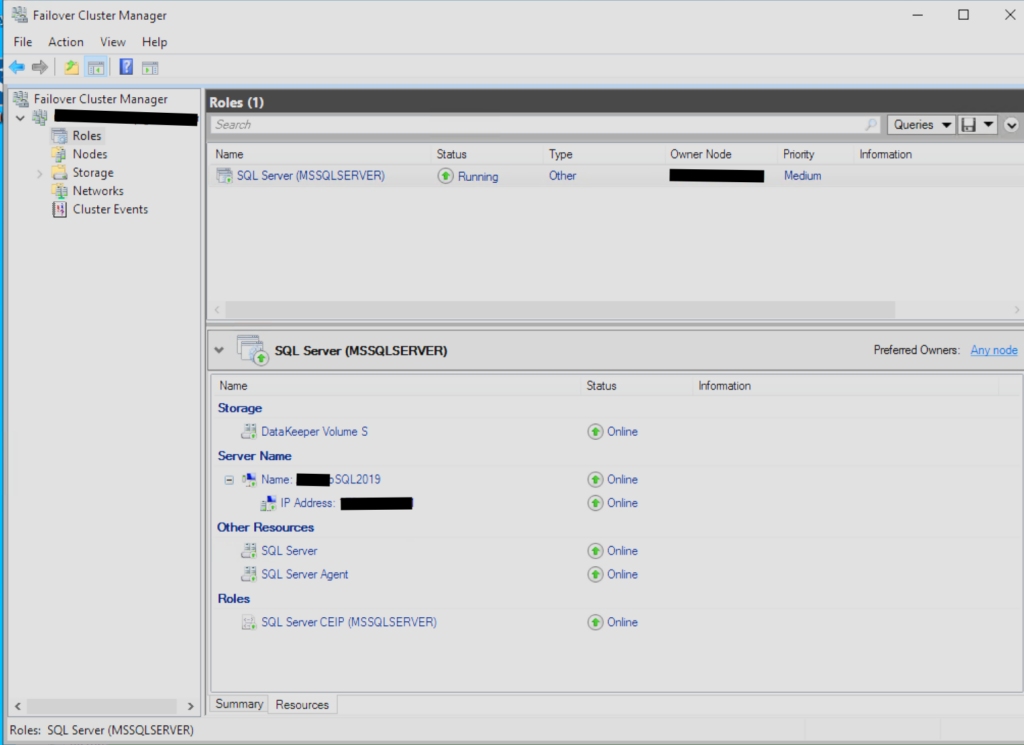
Once you’ve understood as much as possible about your inheritance, your next step is to begin taking care of what you’ve been given, as depicted in the illustration above. When “inheriting” ownership of a SQL Server Cluster, it is crucial to identify and communicate with all cross-functional teams impacted by cluster administration. A few key areas, as there are numerous, to focus on include:
SQL Server or Application Team
- Being proactively notified about any planned changes to SQL Server names or instances
- Informed of large SQL inserts or operations that may impact cluster performance
- Provide details on the locations of the database files, backups,s and snapshots.
Networking Team
- Communicate plans to move a SQL role or related resource to a different network.
- Share information on new IP addresses or other network-related changes that could affect cluster operations
Storage Team
- Being cautious when making changes to the Source and Target volume (e.g, resizing, formatting, or adding partitions) for these can have an impact on DataKeeper replication.
- Is there ample bandwidth for the existing mirror?
- Are you able to collaborate with the Networking Team to ensure bandwidth is sufficient, isolated from other applications to avoid bottlenecks?
Why Runbooks Matter in a DataKeeper Environment:
Runbooks are an essential part of a smooth operation and provide great resolutions for environments utilizing DataKeeper, for cluster administrators and related technologies. Ideally, a well-crafted runbook should be a “living document” that evolves over time, reflecting changes in infrastructure, workflows, and best practices. If previous administrators have done the due diligence, your runbook should have comprehensive coverage in the following areas:
- Break/Fix: working through known issues, which could be anywhere in the “stack,” e.g, Physical Layer all the way up to the Application Layer
- Workflows: deploying software and managing routine day-to-day cluster operations
- Maintenance: how is patch management performed, database backups, etc
- Vendor support: how to reach SIOS, Microsoft, AWS, and other providers
- Most importantly, when to “reach out” to them?
Key Takeaways For Inheriting DataKeeper
This blog highlights several important talking points for navigating such transitions, including account administration, resource ownership, cross-functional collaboration, and the value of runbooks. **However, it’s important to note that these are just a few considerations among many others that may fall outside the scope of this discussion. Every environment is unique, and successful cluster administration requires a thorough understanding of the specific infrastructure, dependencies, and workflows involved.
Enjoy your “inheritance” . . .
Don’t spend it all in one place . . .
Request a demo to see how SIOS DataKeeper can help simplify cluster administration and support high availability.
Author: Greg Tucker, Senior Product Support Engineer at SIOS